22 February 2013

Spring Fever


February, scientifically the shortest month of the year! No wonder then that it constantly feels like I don’t have a second to spare. Also it is the time of the year when many get visited by that little winged creature with bow and arrow forcing people to buy lavish and expensive gifts. Luckily for me, I was in transit on a plane, flying between time zones and he never got to me. Still, I’m sure one of his relatives will get to me before the year is out.

Right then, onto business, and here at the head office in Stuttgart it’s been full throttle. Version 8 has been delivered to all of our German update customers first week of February and as a result the phone has not stopped ringing since. I mean that literally, I can still hear the ringing tone at nights, ringing away in my dreams. What I find really strange though is that even in my own dreams I find it compelling to answer. Good thing is that Palette CAD 8 has been received very well here in Germany and it seems people are very excited by its potential.

Internationally we have been busy too. Three fantastic days at Kok in Wels saw us meeting with many of our international users. Finally got to put some faces to those emails and internet posts. Once again we showed off what’s to come in Palette CAD 8 and the response was great as always. 


While on the subject, we are putting the finishing touches on the module and program function translations and I really hope that we can get cracking on the programming for the other languages by the end of this month.

Last week I was in Kuwait at NI Ceramics for a couple of days holding a tiling training course and also sampling the local life courtesy of my hosts. NI Ceramics is the biggest ceramic tiles manufacturer in Kuwait and I got to meet with their representatives last year at Cersaie where they had a very stylish stand.  During my visit last week I was also given the factory tour where I got to see how the tiles are produced from raw materials to the finished product. Here below are some pics from my travels, and my favorite is the laser guided Terminator, that physically moves the goods and acts as the link between the different machines within the factory environment. I would also like to take this opportunity to say thank you to all the guys at NI Ceramics for their fantastic hospitality. Also as agreed, next time I visit, I will be coming in shorts and flip-flops to take in some of that great climate.


I also received some work from France to add to our growing list of international users. The work underneath was done by an interior design company, Inside, situated at the very north of France. It’s the closest to England we’ve come so far but I’m sure we’ll get there soon! For more information about Inside and a chance to see more of their projects visit their website at http://www.inside-deco-tendance.com/ .  I also uploaded some more pictures I received onto our International Facebook page.


I think that about covers it for now so until next time, keep it fun and keep your work coming in!


Greeting from Stuttgart,
Your Palette CAD-Blog Team


27 January 2013

Tip of the month! January: Grouping & saving objects


You spent some time on your plan, constructed a great looking wash basin or a stove but you don’t want to build it from scratch every time. No problem, simply group, save and reuse! Here’s how…


Grouping objects together to create a group / single object:

First select all the objects to be grouped by creating a selection window over them or holding down the shift key and selecting each one (my example below is wash basin made up of 6 single objects).


Now go to „Group” menu and select „Define By Name“.


Name the group as desired but preferably something meaningful as the same name is used for the object later when saving it. Palette CAD now treats this group as a single object so therefore we can now save it as such.


Saving self-created group / object

Select the group / object you wish to save and then go to the "Objects" menu and then select "Save Object". This opens the browser for object catalogues.


Background info: Basically a catalogue is the main, central folder. In a catalogue, you can create as many sub folders (files) as you wish. And in a file, you can save any number of objects.


We will do exactly that then, create a new catalogue and a file under it. Go to the left side of the browser, under the list of all the catalogues, and then press the right-hand button on your mouse. A menu will pop up, here select "New catalogue". Name it as desired, for example, “Self-Created Objects" and click on OK.

The catalogue "Self-Created Objects" has now been created. Alternatively, you can also use the default catalogue provided, "My Objects". 


It is not advised to save objects under existing branch specific catalogues, such as “Tiling” or “Wood”, for example, as these get updated, meaning old versions get deleted.

In our new catalogue “Self-Created Objects ", create a new file, for example "Wash Basins". Now look at the bar, which is displayed at the bottom.


Under "File" you must enter a name (in this case "Wash Basins”) in order for the "Save" feature to become selectable.


Field “Object” is where the name of the object is chosen, but it is normally copied from the name given to the group earlier.


Follow the above steps and then select  “Save“.


Job done!! Now you can use the newly made objects in all of your existing or future plans, so, what are you waiting for, get your creative hat on.


Greetings from Stuttgart,
Your Palette CAD-Blog Team


23 January 2013

January Blues

So it appears that after that little scare on 21/12/2012 the world still stands and we are still here. Good news I say! The holiday season is slowly getting left behind but I'm sure many of you like myself still feel the after effects long afterwards. January seems to go on forever which is weird as there is plenty to do so even the "longest month of the year" is not enough time to catch up on the aftermath of the holiday season.

Then we come to the new years resolutions. Here, I think, mine will bring many joy throughout 2013. I will start translating version 8 of Palette CAD into various languages before the end of January. Yes, that means as I write this super blog, we have a German version 8 that is ready to go, or version 8.04.156 to be precise. Although at this time I still cannot give any exact dates for finished translated versions, we are definitely one step closer and moving in the right direction. Following is the link to our YouTube channel where you can watch a few palette CAD 8 videos, I must confess that it is in German but will give you some idea of what to expect in the next few months: http://www.youtube.com/user/palettecadkanal?feature=results_main

So , what else is new at Palette CAD? Domestically we had a stand at Bau in Munich last week where we showcased version 8 of the program.  Internationally we will be at Kok in Wells, Austria from 29/01 until 01/02. Many of our European partners will be visiting, and I myself will be there, so if you want to meet the team please stop by our stand at hall 20, stand C 204. You can also find more information about the exhibition at www.kachelofenverband.at .

No new year starts without a look back at the previous one, so here are some fine examples of plans in Palette CAD 7 from our international users posted on our Facebook page. For your chance to get under the spotlight simply post your work at http://www.facebook.com/groups/164040557075439/ .

Keep warm this winter with Ofenbau Neuner from Katharina Schuchardt in Austria.

Mamma Mia, what wonderful kitchen design by Martin Stockner from Italy.

Palette Open proposal by Adrian Szulik from Poland.

Fantastic design, beautiful view by Miha Hrovat from Pečarstvo Hrovat in Slovenia.

Relax at sunset by Marianne Lüning from Sweden.


Finally, a  big thank you from all of us here at Palette CAD and together lets make 2013 a phenomenal year.


Greeting from Stuttgart,
Your Palette CAD-Blog Team


18 December 2012

Tip of the month! December: Inserting company logo

So, you have worked your socks off, creating a perfect picture or panorama for your next sales pitch but you want to finish it off with your companies logo, to give it that extra professional touch. Fear not, it is very easy when you know where to look.

Easy as 1,2,3:

First open the Settings menu and select Options. This can be done either right after you start Palette CAD or once you are working with a plan.


Next, from the left hand side menu select Input/Output and then choose Company info. Here the current selected logo will be shown, probably looking very similar to the screenshot below. As much as we'd love you to keep using our logo, should you want to change it to your own, click on Select your companies logo.


Now you will be in your computers explorer so from here just find and select the image you wish to use. Please notice that you may need to change the file format in order for your image to be visible. PNG is default but most commonly picture files will be under JPEG format.


Finally when saving the picture/panorama/film you wish to use, you have the option to further edit the appearance of your selected logo. These include size, positioning and opacity, and can be found under Company logo tab.


Well that's all for this time folks. Below is another one of my football inspired baths featuring the Palette CAD logo.


Greetings from Stuttgart,
Your Palette CAD-Blog Team


3 December 2012

Santa Claus is coming to town!

The holiday season is well and truly underway, and as with most coins, there are two different sides to next few weeks. It is important to acknowledge them both in order to come out on top in the end.

Firstly there is the buildup and everything that comes with it. For most of us that means longer days at the office, dealing with equally stressed out customers and putting in that extra push to end the year on a high. Then there is the shopping, fighting your way through the masses, trying to get the best deal out of the highly inflated prices. It is a ritual I go through year after year and still every time it comes to it, I feel as lost as Alice was in Wonderland. The creativity part of my brain goes into hibernation for the month and the simplest task of choosing a gift for my loved ones becomes equivalent of climbing Mount Everest. Finally there is the dreaded question, what would you like for a present this year? I always think of a number of useful things I need, in February and August that is, but, as there is never pen and paper to hand to write them down, and my first choice Porsche 911 Turbo is still “slightly” out of reach, all is forgotten by the time the question comes around. 

Still, then there is the other side of the coin, and this is the one I prefer to focus on. Regardless of which holiday it is you celebrate, it is the experience of sharing it with the people you love that makes it so special. Those few days where the family gathers together and you can allow yourself second and third helpings of diner, the work parties where its ok to drink a little too much in front of your boss, going out and dancing the night away with your friends that are back in town, or simply getting up late, sitting down with something wet to drink and watching a seasonal movie. There are decorations everywhere, bright lights, and if you are lucky enough, snow outside.

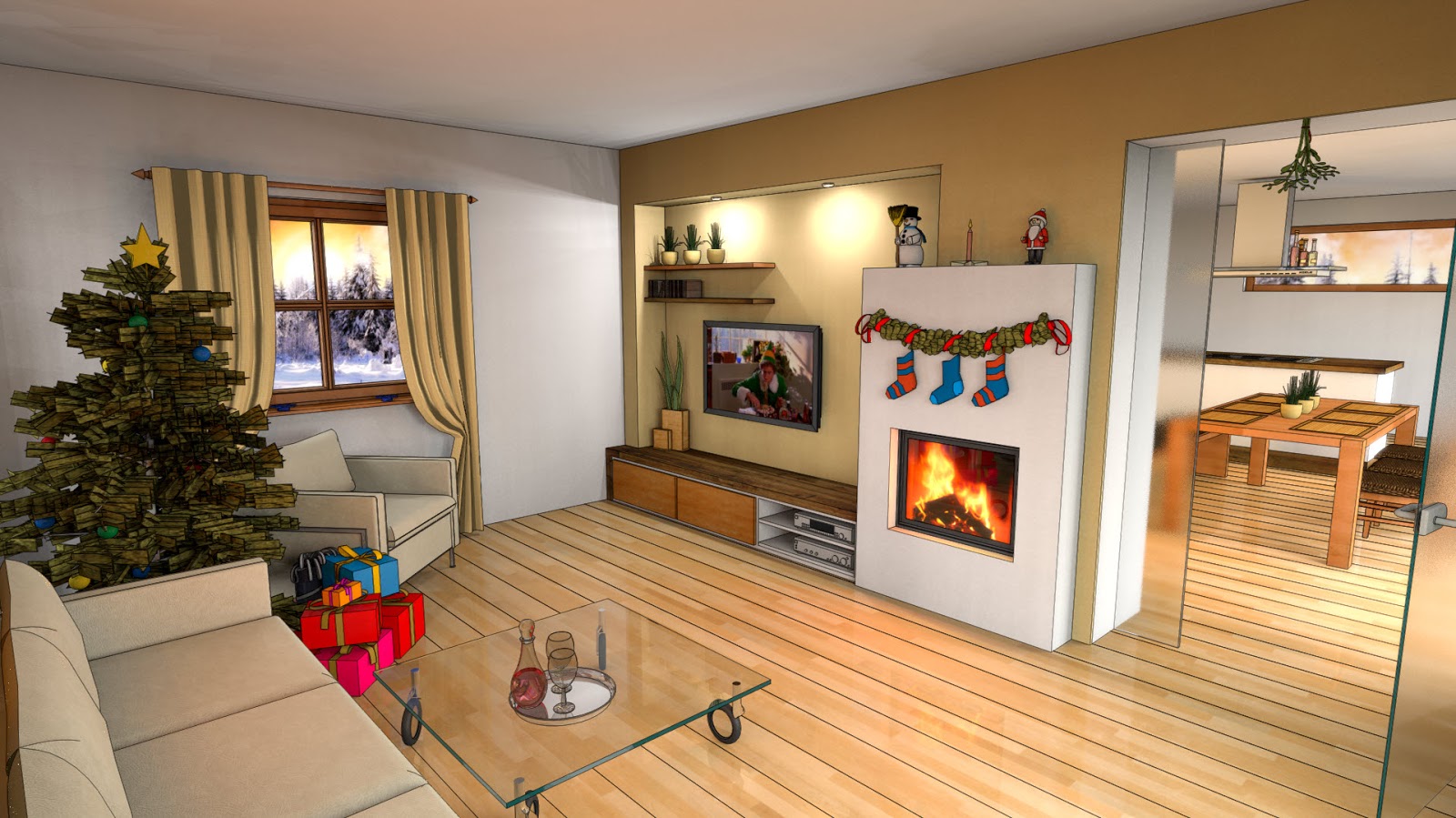
Now we’ve set the mood, and it is this line of thinking that has inspired me to take one of our Palette CAD master plans and add some seasonal magic to it. It is a simple idea that can be used on previous plans of your own to give them a quick update as well as provide some seasonal advertising, in showrooms for example.You can also see the original plan and compare them at our Facebook page.


This is then a perfect time to reflect on the year gone by and look forward to the adventures in the coming one, and here at Palette CAD it has been an eventful one. 

The company has been growing very strongly this year and we were represented at many national and international exhibitions, with our attendance at one of the biggest in the tiling industry, Cersaie, recently covered in a blog by myself further below.  

Already we are looking at a busy schedule in the first half of next year. To start off we will be at BAU 2013 in Munich between 14 and 19 January. It is one of world’s leading building trade fairs held every two years. In 2009, BAU attracted more than 235,000 visitors and over 2000 exhibitors. To find out more about the trade fair and see the layout map you can visit the official website at http://www.bau-muenchen.com/en/Home. Palette CAD will be in hall A6 stand 530.

Also on January 31st and February 1st we will be at KOK Austria 2013 in Wels. It is a very important exhibition focusing on tiled stoves and home ceramics. You can find us in hall 20 stand C204. More information about the exhibition can be found at http://www.kachelofenverband.com/exhibition/kok-austria-trade-fair/. I will be present at both exhibitions so feel free to stop by for a visit.

Year 2012 also saw growth and investment for our international market and therefore the company responded by increasing focus on helping our international partners and customers. We have added international social media to our already existing German sites. A new Tip of the Month feature has also been added to the existing blog, providing that extra little help for your common hotline queries.

The guys in the programming department have been working very hard to bring out version 8 of the program, which is currently in its testing phase for some of our German customers. We are hoping to have a solid version in time to cure the January blues for our existing service partnership customers here in Germany.

What that means for the rest of us, non-native German speakers, is that translation into other languages can begin soon after with a view to release translated Palette CAD 8 in the first half of 2013.

I have been lucky enough to get a chance to play around with Palette CAD 8, and since I got it in November, my creativity was still around, allowing me to come up with the idea to reproduce a room from a very famous action sci-fi movie, see if you can guess what it is. It goes to show that uses for the program are far from conventional so don't be afraid to experiment a little.


I have not been the only one thinking outside of the box and our recently started international group on Facebook has seen some great and innovative designs. Following its growing success I would like to invite our users to join our group and post your designs for others to see. From next month I will be choosing my favorite picture, which will then be featured in my blog earning the creator a place in the spotlight. So far we have had representation from UK, Germany, Sweden, Slovenia, Italy, Austria and Poland. Time to get creative and represent, so join the group at http://www.facebook.com/groups/164040557075439/

Below is the very first picture to be posted on the page, designed by yours truly. It was one of my first projects and I drew my inspiration from the recent Euro 2012 tournament and England’s overwhelming success.


In closing and as I said at the beginning, the end of 2012 is near, so I would like to leave you to think about the following:  He's making a list, he's checking it twice, he's gonna find out who's naughty or nice, Santa Claus is comin' to town!

Happy holidays
Your Palette CAD-Blog Team


13 November 2012

Wind of change

For those returning to read my words of wisdom and inspiration, you may notice a new look and design to the blog.

To start off with, should English not be your first choice of languages you can now find Google Translate on the right hand side. Unfortunately my extraordinary charm and wit may be lost in translation but at least you can understand the core of the subject.

Should you find the blog to be a good read, please feel free to spread the joy using the new share options for the other social media outlets, also found on the right hand side.

I have also tried to make it easier to leave feedback quickly introducing the reaction boxes at the bottom of each blog. "Useful", "Interesting" and being British , I had to throw in "Fit for the Queen" in there. Don't forget you can also directly leave feedback or topic suggestions at egrabic@palettecad.com as well as ask for a request to be added to my personal blog mailing list.

While we are on the subject of change, take a look at the Palette CAD case study recently published by BCGSoft at www.bcgsoft.com/casestudies/palettecad.htm . It highlights the GUI changes in Palette CAD 8, giving it a more Windows 8 look and feel.

Lastly, and of course saving the best for last, I am very happy to announce our new Palette CAD International Group page on Facebook. I hope it will prove to be a great platform to share ideas, give and find tips and tricks, showcase your hard work for all to see and rate, a place to meet some fellow users and enthusiasts from across the globe and maybe a chance to practice your knowledge of other languages.

The place to be is www.facebook.com/groups/164040557075439/ so make sure you visit, tell your friends and join our group. To start us off I will be showcasing my England inspired bathroom so let me know what you think.

As always, it has been a pleasure, so, till next time...


Greetings from Stuttgart,
Your Palette CAD-Blog Team


7 November 2012

Tip of the month! November: Adding new materials


Sometimes you want to have a specific texture or a background for your design but these are not always already stored in Palette CAD. Not a problem, because, following these simple instructions you can add all the materials your heart desires. Just remember the quality of your texture is determined by the picture provided.

How does it work then:
First, start the material library browser by clicking on the Material button or by selecting Material from the Properties menu.


In the material library, on the left hand side you can find a number of catalogs. These can in turn contain a number of files which contains a number of textures. For example catalog “_Colours” contains a file named “System” and here you can find a number of textures.

The storage system is therefore as follows: Catalogs → Files→ Textures.

To save a material then, you should first, select a catalog. You can either use the catalog "My Materials" or create a completely new catalog. To create a new catalog, select “Material” and then right-click on your mouse and select “New Catalog”. Name it something meaningful, I used “Own Materials” in my example below.


Now you need to create a new file under your new catalog in which you can import textures. Follow very similar steps as above only this time selecting the newly created catalog, right-click on it and select “New file”. In the example below I named the file “My Backgrounds”. Now you have created the basis to save a new texture.


Next select the newly created file ( “My Backgrounds” in this example) and click on the option "New Material " at the bottom of the browser.


Now you are in the material properties browser. You are now presented with two options.
Selecting “Colour” you can add any number of colours and you can also add a specific RGB colour under “Other colours” and “Custom” if you know the exact codes.

The other option is to select "Texture" and in the field “Edit” enter the name for your new texture ( in the example below I used “PaletteCAD Stand”). Then click on "Select Texture" and you will be taken to your operating systems browser. From here find the location of the required texture on your PC and open it. 


It is now saved in your library and can be used or edited in the future like any other already existing material.

Right then, time to get creative and have fun!

Greetings from Stuttgart,
Your Palette CAD-Blog Team